52 film and camera prompts for MOSS-Image
Portra, CineStill, Tri-X, Polaroid, Holga, light leaks, tintype and more: 52 film and camera prompts for MOSS-Image, each with its negative prompt and result. Plus what didn't work.
I made 42 film and camera prompts for Z-Image last week. MOSS-Image is the other free model I keep coming back to: in my comparison it followed prompts more closely than Z-Image or Krea 2. So I ran the same 68 film stocks, cameras, color looks and kinds of broken film through it.
The first run went badly. With the wording that worked on Z-Image, most looks barely changed MOSS's picture. It took a different way of prompting, below, and then 52 of the 68 showed: ten more than on Z-Image, including light leaks, pinhole and the dark corners of a Lomo, which Z-Image couldn't do at all. Each one is below with the exact words, the negative prompt and the result.
The short version
- Use the negative prompt. MOSS runs at CFG 2.5, so its negative prompt really steers the picture (Z-Image Turbo runs at CFG 1, where it does nothing). Name the look's opposite there: for black and white, "color, colorful, saturated colors".
- Say the look twice. Put the look at the start of the prompt and again at the end. At the end alone it was weaker still.
- Describe what the film does to the picture, not what it is. "Tungsten balanced, soft highlight rolloff" did nothing. "Cool blue-teal shadows, warm orange highlights" did.
- For black and white, take the colors out of the scene. If the scene says "red geraniums" and "green shutter", MOSS draws them in color whatever the look says.
- Describe the pose exactly. Every change to the prompt nudges the picture. Spelling out the head, chin, eyes and arm kept her nearly still from look to look.
- Say exactly what to add. MOSS ignored "a faint second image". "A night city skyline printed over the entire photo" worked.
All 52 looks are also in the Film Looks pack as a ComfyUI dropdown that builds the prompt and the negative prompt for you, if you'd rather not copy them by hand.
How I tested
Everything ran on MOSS-Image in ComfyUI 0.44 on an RTX 5080, with ComfyUI's MOSS template settings: the int8 model file, er_sde, 25 steps, CFG 2.5, 1216×832, no LoRAs and no prompt rewriter. The seed is the same for every image and there are no re-rolls, so each image is a one-shot. Each took about 11 seconds.
Each prompt is the recipe, then the scene, then the recipe again. The negative prompt is MOSS's usual one, "nsfw, worst quality, bad anatomy, watermark, jpeg artifact", followed by the recipe's own negative. The Tri-X portrait, for example, was:
Black and white 35mm film photo, gritty visible grain, high contrast, deep blacks, documentary feel. a waist-up portrait of a woman in her mid twenties, oval face, high cheekbones, straight dark eyebrows, hazel eyes, dark brown hair pulled back in a loose low bun with two strands falling across her right cheek, natural makeup, s...
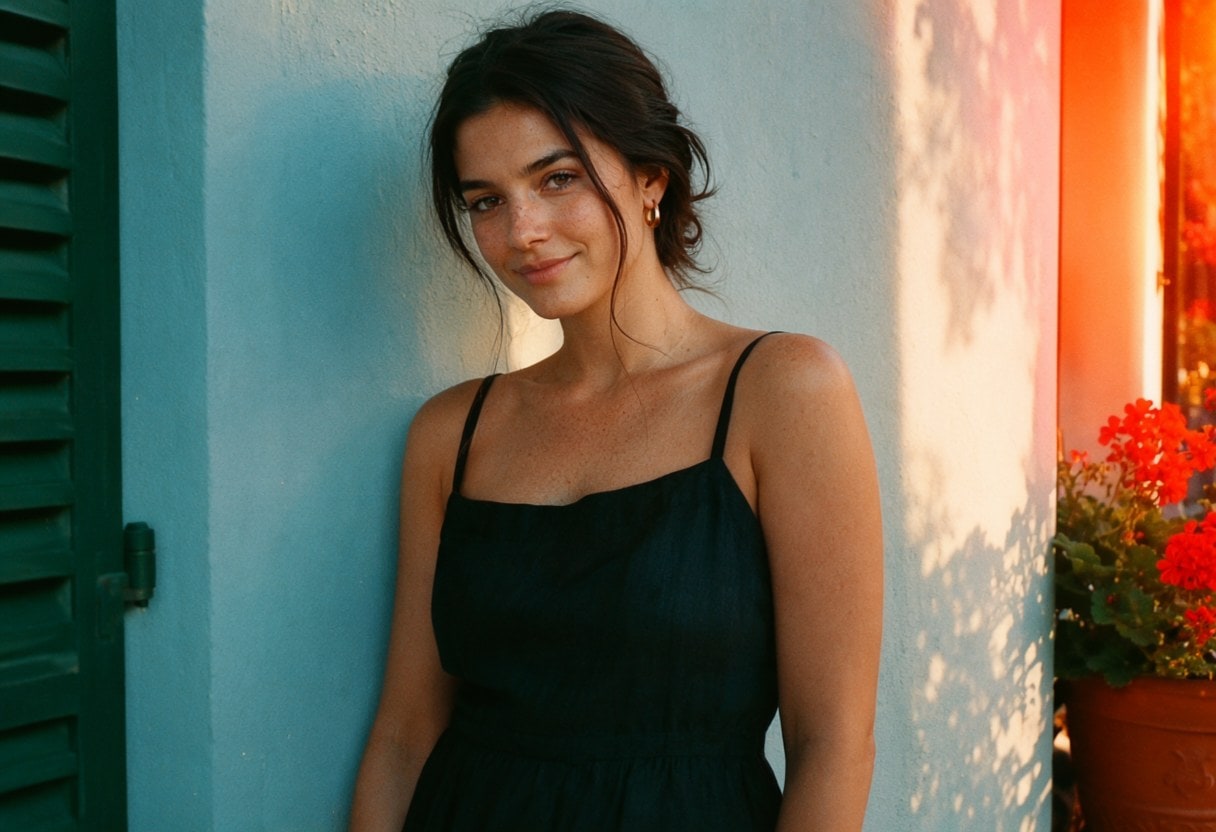
The scene is one portrait: a woman against a sunlit plaster wall, with a green shutter on one side and red geraniums on the other. Skin, a hard shadow, warm light and two strong colors show most film looks well. I started from the portrait in the Z-Image post and changed three things for MOSS. I removed the small mole, which MOSS kept moving under her lip. I described her pose in detail, which kept her still. And I took out "striking" and "fashion editorial", which MOSS read as a glamour shoot.
This is the plain photo, with no film look:
Film stocks
18 of the 20 film stocks I tried. Some are subtle, because MOSS's plain photo already looks a lot like warm color film.
Color negative
Kodak Portra 400
35mm color negative film photo, warm natural skin tones, creamy highlights, soft contrast, slightly muted greens, fine grain.
Negative prompt, after MOSS's usual one:
cold blue tones, washed out pale colors, pink cast, high contrast, oversaturated, clean digital photo, HDR
Close to MOSS's plain photo, which already looks a lot like Portra: warm skin, soft contrast. My first rewrite asked for pale pastels and came out pink and washed out, which isn't Portra at all.
Kodak Ektar 100
35mm color negative film photo, very saturated punchy colors, vivid reds and blues, crisp detail, very fine grain.
Negative prompt, after MOSS's usual one:
muted dull colors, faded, low contrast, desaturated
A little punchier: a brighter green shutter and redder geraniums. Subtle.
Kodak Gold 200
35mm consumer color film photo, warm golden tones, saturated warm reds and yellows, slightly muddy shadows, moderate grain.
Negative prompt, after MOSS's usual one:
cool blue tones, neutral white balance, yellow painted wall, clean digital photo, HDR
Warm golden light and rich reds. My first wording turned the whole wall yellow. Adding "yellow painted wall" to the negative prompt stopped that.
Fuji Superia 400
Consumer 35mm film photo, slight green cast in the shadows, cool tones, punchy greens, moderate grain.
Negative prompt, after MOSS's usual one:
warm golden tones, orange cast, clean digital photo, HDR
Cooler, with greener shadows and a gray-green wall.
Fuji Pro 400H
35mm film photo, airy pastel colors, minty greens, cool soft highlights, low contrast, fine grain.
Negative prompt, after MOSS's usual one:
warm golden tones, deep blacks, high contrast, saturated colors
Airy mint pastels. It's also one of the few looks that turned her toward the wall.
CineStill 800T
Tungsten-balanced night film photo, cool blue-teal shadows, soft red halation bloom around every light, organic film grain.
Negative prompt, after MOSS's usual one:
warm daylight colors, no glow, clean digital photo, HDR
Teal shadows and a red-orange glow at the bright right edge. The real film is made for night, but the color shift shows even in daylight.
CineStill 50D
Daylight motion picture film photo, cool clean neutral daylight colors, white balanced cool, very fine grain.
Negative prompt, after MOSS's usual one:
warm golden tones, yellow cast, clean digital photo, HDR
Cool, clean daylight color instead of MOSS's golden cast. The red glow around bright edges never appeared, so I took it out of the wording.
Slide film
Kodachrome 64
1960s color slide film photo, rich deep reds, dense dark blues, strong contrast, slightly warm, very fine grain.
Negative prompt, after MOSS's usual one:
faded pastel colors, low contrast, clean digital photo, HDR
Deeper reds and darker shadows. Subtle.
Fuji Velvia 50
Color slide film photo, hyper-saturated colors, intense greens and blues, deep black shadows, high contrast.
Negative prompt, after MOSS's usual one:
muted dull colors, low contrast, faded
Hyper-saturated: a vivid green shutter and a yellow-green wall.
Cross-processed slide
Cross-processed film photo, harsh contrast, yellow-green highlights, cyan shadows, blown out skin tones, strange color shifts.
Negative prompt, after MOSS's usual one:
natural colors, neutral white balance, soft contrast
A strong yellow-green cast, like real cross-processed slide film.
Black and white
Kodak Tri-X 400
Black and white 35mm film photo, gritty visible grain, high contrast, deep blacks, documentary feel.
Negative prompt, after MOSS's usual one:
color, colorful, saturated colors, red, green, orange, warm tones, sepia, color photo
Take the color words out of the scene for this one (see below).
Fully black and white, but only after I took the color words out of the scene. More on that below.
Ilford HP5 pushed to 3200
Black and white film photo pushed in development, very heavy coarse grain, crushed black shadows, blown highlights.
Negative prompt, after MOSS's usual one:
color, colorful, color photo, clean smooth tones, fine grain, sepia
Take the color words out of the scene for this one (see below).
Black and white, close to Tri-X. The heavy grain doesn't come through at this size.
Kodak T-Max 100
Black and white film photo, smooth tones, very fine grain, crisp detail, full range of grays.
Negative prompt, after MOSS's usual one:
color, colorful, color photo, heavy grain, sepia
Take the color words out of the scene for this one (see below).
Smooth, clean black and white.
Instant
Polaroid SX-70
Square instant photo with a thick white border, soft focus, faded creamy colors, warm cast, low contrast.
Negative prompt, after MOSS's usual one:
wide rectangular photo, no border, crisp sharp detail, high contrast, clean digital photo, HDR
A white instant-film border and soft, faded color.
Expired Polaroid
Old expired instant photo with a white border, chemical blotches and streaks at the edges, colors bleeding, washed out blue-pink cast.
Negative prompt, after MOSS's usual one:
clean pristine photo, no border, accurate colors, clean digital photo, HDR
The border plus chemical blotches and bleeding color along the edges. Z-Image never managed the blotches.
Instax Mini
Small instant photo with a white border, bright washed out colors, slightly overexposed, soft detail.
Negative prompt, after MOSS's usual one:
wide rectangular photo, no border, dark moody, clean digital photo, HDR
A white border, bright and slightly washed out.
Motion picture
Kodak Vision3 500T
35mm motion picture film still, cool blue-teal shadows, warm orange highlights, soft rolloff into the highlights, subtle grain.
Negative prompt, after MOSS's usual one:
neutral colors, warm golden shadows, clean digital photo, HDR
A teal-and-orange movie grade. That's how most people picture movie film, but the real stock is fairly neutral once it's color-corrected. My first wording, about tungsten balance and highlight rolloff, changed nothing.
Super 8
Frame from a Super 8 home movie, very heavy coarse grain, soft blurry low-resolution detail, faded warm yellow colors, dark rounded corners of the film frame.
Negative prompt, after MOSS's usual one:
crisp sharp detail, high resolution, clean noiseless image, clean digital photo
Yellow and soft, with dark rounded corners like a projected home movie. It took "very heavy coarse grain, soft blurry low-resolution detail" to show at all.
Cameras
The cameras that changed something you can see. Pro camera names did nothing, so they're in the section on what didn't work.
Cheap and toy cameras
Disposable
Overexposed snapshot, flash fired in daylight blowing out bright skin, warm yellow-green color cast, low sharpness, heavy grain, dark vignette in the corners.
Negative prompt, after MOSS's usual one:
soft natural light, no flash, crisp professional photo, clean digital photo, HDR
A yellow-green cast and flat, washed-out flash.
Holga
Square photo centered in the frame, with wide solid black bars on the left and right. Very heavy dark vignette, the corners fade to pure black, blurry smeared edges, only the center sharp, cyan shadows, yellow highlights.
Negative prompt, after MOSS's usual one:
wide rectangular frame, evenly lit corners, sharp edges, clean digital photo, HDR
Black bars on both sides, yellow highlights and green-cyan shadows. It still isn't square, and the corners don't fade to black.
Diana
Soft hazy low-contrast image, glowing blown highlights, pale washed-out pastel colors, strong vignette, blurry everywhere except the middle.
Negative prompt, after MOSS's usual one:
sharp crisp detail, high contrast, saturated colors, evenly lit corners
Pale, hazy and soft.
Lomo LC-A
Oversaturated deep blues and reds, very dark heavy vignette in all four corners, high contrast, slightly underexposed edges, bright center.
Negative prompt, after MOSS's usual one:
evenly lit corners, flat muted colors, low contrast, clean digital photo, HDR
Dark corners, deeper reds and more contrast. Z-Image never darkened the corners.
Pinhole
Entire image soft with no sharp edge anywhere, dim and murky, dark rounded vignette, faded brownish colors, ghostly blur on anything moving.
Negative prompt, after MOSS's usual one:
sharp crisp detail, bright clean image, clean digital photo, HDR
Dim, murky and soft all over. Z-Image only added a frame.
Fisheye toy camera
Round fisheye image, strong barrel distortion bending straight lines, black circular edge around the picture.
Negative prompt, after MOSS's usual one:
straight lines, rectilinear lens, normal perspective, rectangular photo
A round black frame and a bent wall.
Sprocket Rocket
Very wide panoramic 35mm photo exposed across the whole film strip, sprocket holes and film edge markings visible along the top and bottom.
Negative prompt, after MOSS's usual one:
normal rectangular photo, no film border, clean digital photo, HDR
Sprocket holes and edge markings along the top and bottom. Like Z-Image, it kept a normal frame instead of a wide panorama.
Half-frame diptych
Two narrow vertical half-frame photos side by side on one strip of film, a thin dark line between them, slightly different moments.
Negative prompt, after MOSS's usual one:
single photo, one frame, clean digital photo, HDR
Two frames side by side, a moment apart.
Point-and-shoot, old and early digital
Contax T2
Bright direct flash lighting the face flat and white, background a stop darker, punchy saturated colors, crisp center, fine grain.
Negative prompt, after MOSS's usual one:
soft natural light, no flash, muted colors
Brighter flash on her face and punchier color. Subtle.
Kodak Brownie box camera
1950s snapshot, square frame, soft focus away from the center, faded colors or black and white, small white border.
Negative prompt, after MOSS's usual one:
wide rectangular frame, crisp sharp detail, vivid colors, clean digital photo, HDR
A faded print with a white border. It didn't go square.
Kodak Instamatic 110
Fresh 1970s 110 film snapshot print, punchy high contrast, saturated warm colors, bright overexposed highlights, coarse grain, soft blurry detail.
Negative prompt, after MOSS's usual one:
faded, washed out, low contrast, muted colors, crisp sharp detail, clean noiseless image, clean digital photo
A fresh 110 print: contrasty, saturated, bright highlights. My first version asked for a faded print, which is how these look after decades in an album. Faded 1970s print, below, covers that look.
2000s digicam
Harsh flat flash, blown-out white highlights, cool bluish white balance, oversharpened edges, noisy smudged shadows, orange date numbers printed in the bottom right corner.
Negative prompt, after MOSS's usual one:
film grain, soft natural light, professional photo, warm tones
Cool flash color and an orange date stamp in the corner.
Fujifilm Classic Chrome
Muted documentary colors, desaturated blues, firm shadows, slightly cool.
Negative prompt, after MOSS's usual one:
vivid saturated colors, warm golden tones
Muted, cooler documentary color.
Antique processes
Glass plate
Black and white early 1900s glass plate photograph, monochrome gray tones only, soft slightly blurred detail, chipped dark plate edges, silvery fogging in the corners.
Negative prompt, after MOSS's usual one:
color, colorful, color photo, pink, red, green, orange, modern photo
Take the color words out of the scene for this one (see below).
Monochrome with chipped dark plate edges. My first wording came out in color, pink flowers and all, until it said "black and white" and "gray tones only".
Tintype / wet plate
Black and white tintype photograph on a dark metal plate, monochrome brown-black and silver tones only, silvery highlights, swirling chemical streaks and pour marks along the edges.
Negative prompt, after MOSS's usual one:
color, colorful, color photo, pink, red, green, orange, modern photo
Take the color words out of the scene for this one (see below).
Dark metal-plate tones with pour marks around the edges. It had the same color problem as the glass plate at first.
Daguerreotype
Black and white 1840s daguerreotype, monochrome silver-gray tones only, faint low-contrast mirror-like image, dark tarnish and oxidation creeping in from the edges, ornate brass frame around the picture.
Negative prompt, after MOSS's usual one:
color, colorful, color photo, pink, red, green, orange, modern photo
Take the color words out of the scene for this one (see below).
Silver-gray, with tarnished edges and a brass frame. Same fix as the glass plate.
General looks
No film stock, just a color treatment: what people usually mean by "make it warm" or "give it a vintage filter."
Warm golden
Warm golden color, honey-toned highlights, soft amber shadows, gentle film grain.
Negative prompt, after MOSS's usual one:
cool blue tones, neutral white balance
Warmer all over.
Faded 1970s print
Faded 1970s photo print, washed out colors drifting toward orange and magenta, lifted milky blacks, soft grain.
Negative prompt, after MOSS's usual one:
vivid saturated colors, deep blacks, crisp, clean digital photo, HDR
A slight orange-magenta drift and softer blacks. Subtle.
Matte faded film
Matte faded film look, lifted gray-black shadows, low contrast, muted colors.
Negative prompt, after MOSS's usual one:
deep blacks, high contrast, vivid saturated colors
Flatter, grayer shadows. Subtle, because MOSS's photos are already soft.
Cool muted
Cool muted colors, desaturated blues and greens, soft gray shadows, quiet overcast mood.
Negative prompt, after MOSS's usual one:
warm golden tones, vivid saturated colors, sunny
Blue-gray and quiet.
Teal and orange
Cinematic color grade, teal-tinted shadows, cool blue-green tint in the shade, warm orange skin tones, the wall keeps its own pale color.
Negative prompt, after MOSS's usual one:
neutral colors, natural white balance, teal painted wall, blue painted wall
Teal in the shaded wall, orange skin. My first wording painted the wall teal. Asking for the wall to keep its own color, with "teal painted wall" in the negative prompt, fixed it.
Bleach bypass
Bleach bypass film look, muted desaturated gritty colors, a black-and-white silver image laid over the color, skin looking cold, metallic and exhausted, deep dense shadows, bright hard highlights, prominent grain.
Negative prompt, after MOSS's usual one:
vibrant saturated colors, warm golden tones, soft low contrast, colorful, warm healthy skin
Take the color words out of the scene for this one (see below).
Muted, cold and gritty, with silvery skin. It only worked once I took the scene's color words out, as with black and white.
Sepia
Sepia toned old photograph, warm brown monochrome, soft faded edges.
Negative prompt, after MOSS's usual one:
color, colorful, color photo, blue, green, red, cool tones
Take the color words out of the scene for this one (see below).
Brown monochrome. It also needs the color words taken out.
Warm vintage filter
Warm vintage photo filter, boosted yellows, faded blacks, soft vignette.
Negative prompt, after MOSS's usual one:
cool blue tones, crisp modern clean digital photo, HDR
Warm, with boosted yellows.
Pastel dream
Soft pastel colors, airy overexposed highlights, pale pinks and mint greens, dreamy low contrast.
Negative prompt, after MOSS's usual one:
deep blacks, high contrast, dark moody, saturated colors
Pale pinks and mint. It painted the shutter mint.
Moody dark
Dark moody look, deep crushed shadows, muted desaturated colors, small pools of light.
Negative prompt, after MOSS's usual one:
bright airy, evenly lit, high key, vivid colors
Darker, with deep shadows around her.
Golden hour glow
Glowing hazy golden backlight, soft lens flare, warm bloom around the highlights.
Negative prompt, after MOSS's usual one:
flat overcast light, cool tones, no flare
A warm glow and a bright flare at the right edge.
Broken film
Damaged film, which Z-Image couldn't do at all. Seven of the ten I tried show on MOSS, a few only subtly.
Light leaks
Red and orange light leaks streaking in from one edge of the frame, burned-out patches of color.
Negative prompt, after MOSS's usual one:
clean pristine photo, evenly exposed, clean digital photo, HDR
Orange-red leaks streaking in from both edges. Z-Image couldn't do this one.
Fogged film
Fogged film, a milky white haze over the whole picture, washed-out low contrast, pale faded colors, glowing foggy highlights.
Negative prompt, after MOSS's usual one:
clear crisp photo, deep blacks, high contrast, clean digital photo
A milky haze over the whole picture. It needed "a milky white haze over the whole picture" before it showed.
Accidental double exposure
Double exposure, a night city skyline with glowing windows printed over the entire photo, buildings visible through her face, her dress and the wall, both layers semi-transparent.
Negative prompt, after MOSS's usual one:
single exposure, one image, clean photo, plain wall, clean digital photo
A night city printed over her and the shutter. MOSS ignored "a faint second image", and when I asked for a forest blended in, it printed the forest onto her dress. It worked once the prompt said exactly what to overlay and where.
Scratched negative
Long thin white vertical scratch lines running down the whole image, white dust spots and hair specks scattered across it.
Negative prompt, after MOSS's usual one:
clean pristine photo, clean digital photo, HDR
Two thin white scratch lines. Subtle. Asking for many scratches gave me fewer.
Smeared lens
Dreamy smeared glow, every bright area bleeding a soft halo into the picture, hazy low contrast.
Negative prompt, after MOSS's usual one:
crisp sharp detail, high contrast, clean digital photo, HDR
A soft glow around the bright areas. Subtle.
End of the roll
The right third of the image burned out to bright orange and red, a hard ragged edge where the film ends, the rest of the picture normal.
Negative prompt, after MOSS's usual one:
evenly exposed full frame, clean photo, clean digital photo, HDR
The right edge burns out to orange and red, like the last frame on a roll. Z-Image couldn't do this one either.
Expired film
Expired film, shifted colors drifting toward magenta or green, faded blacks, heavy grain.
Negative prompt, after MOSS's usual one:
accurate natural colors, deep blacks, clean, clean digital photo, HDR
A slight green-yellow shift. Subtle.
What made it work
These are the changes that took MOSS from "barely different" to the results above, one at a time.
The negative prompt. On the left, Tri-X with the look at the start, as on Z-Image: her skin goes gray, but the shutter and geraniums stay in color. On the right, the look at the start and the end, with "color, colorful, saturated colors" in the negative prompt. Most of the color goes.
Taking the color words out of the scene. Even with the negative prompt, the scene still said "green wooden shutter" and "red geraniums", and MOSS kept them in color. On the right, the same prompt with "green", "red", "terracotta" and "warm" taken out of the scene. It's fully black and white: under 1% of the pixels have any color, against 19% on the left. The same fix made bleach bypass and the antique processes work.
What the film does, not what it is. Vision3 500T, described as "tungsten balanced, soft rolloff into the highlights, rich shadows", on the left. Described as "cool blue-teal shadows, warm orange highlights", on the right. Portra 400, CineStill 50D, Super 8 and fogged film all needed the same kind of rewrite. Push too hard, though, and MOSS repaints things: "teal shadows" first turned the wall teal, and "warm golden" turned it yellow. Naming the wrong result in the negative prompt ("teal painted wall") fixed both.
Her pose. The seed fixes the starting noise, but every word nudges the first steps, where the pose is decided. With a loose pose description she leaned, turned and swung her arm from look to look. Adding "chin slightly lowered, eyes looking straight into the lens, right arm hanging relaxed at her side, cropped at the waist" kept her close to the plain photo in most recipes. The looks that change the frame, like the Holga and the fisheye, still move her a little.
What didn't work
Pro cameras. Leica, Canon AE-1, Hasselblad, Pentax 67, Rolleiflex, 4×5, the Helios 44 lens, Olympus Mju-II and the iPhone changed nothing I could see, as on Z-Image. These cameras don't have a look of their own. Pick the film instead.
Blur. Missed focus, motion blur and a mouldy lens all came out sharp, even when I wrote "the woman is blurry and soft, her face not sharp". MOSS seems to hold on hard to a clean, in-focus subject.
The first double exposures. Before the city skyline worked, MOSS printed a forest onto her dress, and then onto her shoulder like a tattoo.
LomoChrome Purple. It should turn greens purple. The colors shifted, but toward teal and gold, never purple. It failed on Z-Image too.
Looks MOSS already has. Portra 800 and Faded 1990s snapshot worked on Z-Image but barely changed MOSS's picture. Its plain photo is already warm, soft and a little filmic, so a gentle film look has little left to change. The flip phone didn't show either: MOSS wouldn't make a low-resolution photo.
MOSS or Z-Image?
MOSS did 52 of the 68 looks, Z-Image 42. The ones only MOSS could do are light leaks, the end of a roll, fogged film, scratches, a smeared lens, expired film, the double exposure, the pinhole camera, the Lomo LC-A's dark corners, CineStill 50D, Vision3 500T and, subtly, the Contax T2's flash. It also kept the same woman in every picture, where Z-Image's face drifted a little from look to look.
Z-Image is faster, at about 8 seconds an image at its usual 8 steps against 11, and needs only the look at the start of the prompt, with no negative prompt. MOSS needs more work per prompt, but gives more back.
What I'd use
For a natural film photo, MOSS's plain output is already close to Portra, so try it without a film look first. For night or a movie feel, CineStill 800T or Vision3 500T. For strong color, Velvia or cross-processed. For black and white, Tri-X, with the color words taken out of the scene. For something found in a drawer: the Polaroid, the Instamatic, the 2000s digicam, a tintype or light leaks.
Write the look in visible terms, put it at both ends of the prompt, and give it an opposite in the negative prompt. I tested one seed per look, so if a result looks off, try another seed before giving up on the recipe.
Want this ready to run? The Film Looks pack has 12 ComfyUI workflows and 119 tested prompts for Z-Image Turbo and MOSS-Image, including all 52 of these looks in a dropdown that builds the prompt and the negative prompt for you.
Tested in November 2026 on an RTX 5080 with 16 GB of VRAM.
42 film and camera prompts for Z-Image