The best Z-Image Turbo settings, tested: steps, CFG, sampler and more
Z-Image Turbo settings tested one at a time: steps, sampler, scheduler, CFG, shift and resolution. 76 images, a compare tool, and the karras myth.
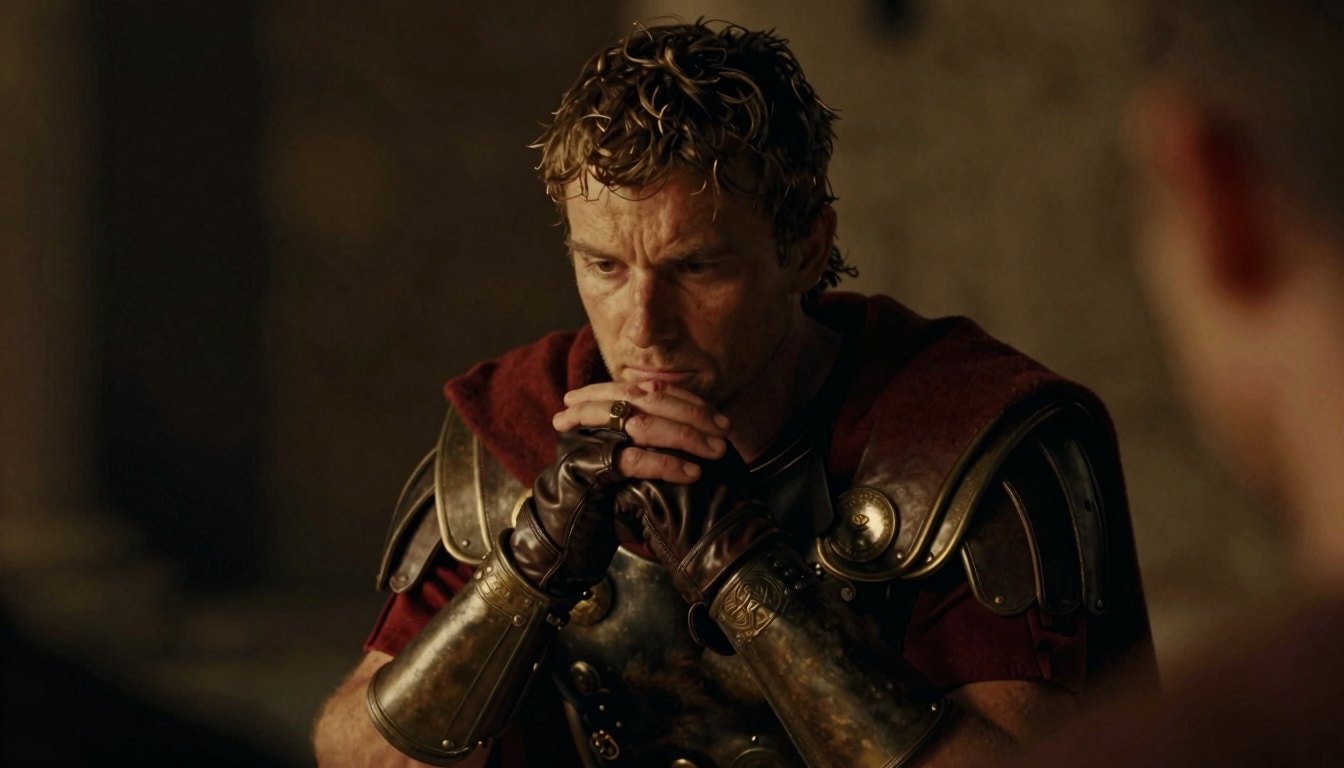
One dropdown in ComfyUI can wreck a Z-Image photo. Switch the scheduler from simple to karras. A sharp portrait of a Roman officer turns into soft orange mush, even the ring on his hand. Nothing else changed, not even the 6 seconds it took to generate.
That was the biggest surprise in 76 tests. I used one prompt for all of them: a Roman officer at a table at night. I ran it on two seeds and changed one setting at a time. Everything else stayed at the default, which is 8 steps, CFG 1 and shift 3 at 1344×768. The sampler was res_multistep with the simple scheduler, on a 16 GB card.
The sampler and shift barely changed anything. The scheduler and CFG can break it. The advice I kept finding online was DPM++ 2M Karras at 25 steps, and that made the picture rougher and two and a half times slower.
I'd keep 8 steps and CFG 1. Pick euler or res_multistep, with the simple or beta scheduler. Go up to 16 steps if you want a bit of film grain. Choose a setting below and drag across the image to compare it with the default. The zoom button jumps to the hands and the ring, which is where bad settings show first.
Every image below uses this prompt, with only the setting changed:
medium close-up of a Roman legionary officer in his thirties with short messy brown hair sitting at a table at night, eyes lowered, lost in thought, his hands clasped in front of his chin, a worn gold signet ring on one finger, fingerless leather gloves, a dark red wool cloak over Roman leather armor with ornate embossed bronze vambraces and a round bronze brooch pinning the cloak at the shoulder, warm low amber light falling across his face and hands from the left, the right side of his face in deep shadow, the background a deep out-of-focus blur of dark shapes and soft warm shapes, the dark out-of-focus shoulder of someone in the foreground framing the bottom and edges of the shot, shallow depth of field, 50mm anamorphic lens, 35mm motion picture film, fine grain
How many steps?
Z-Image Turbo is trained to finish in 8 steps, and 8 is where it looks best. At 4 the skin goes waxy. Up to 12 it barely changes. At 16 it's still good and picks up some film grain, which I liked. At 25 it starts to look hyper-real. The skin gets blotchy, and on seed 2121 he grows a second ring.
On a model this fast, extra steps mostly buy you time on the clock. Past 16 they start to hurt.
Which sampler?
Euler, res_multistep and dpmpp_2m make almost the same picture. Pick any of them. Some samplers add noise every step, like dpmpp_sde, er_sde and euler_ancestral. They change the face and the pose. You get a new picture with no gain in quality. On er_sde the ring nearly vanishes. LCM comes out soft and flat.
Which scheduler?
I ran these on euler at 8 steps. Karras and exponential break the image. Karras turns everything soft and orange, and exponential adds a screen-door pattern on top of the blur. Beta is the only one that beat simple, with a little more texture in the leather and the bronze.
At 8 steps, karras falls apart. The 25 steps in the popular advice hold it together, at two and a half times the cost.
What CFG?
At CFG 1 the negative prompt is ignored, which is how Turbo is meant to run. At 1.5 the contrast goes up and the bronze pops. At 2 it's a little warm and washed out but usable. At 3 it burns, and at 4 seed 3434 turns into black bars and smeared red. Anything above 1 also doubles the time per image, because the model runs twice.
Shift
Shift changes how the model splits its steps between rough shapes and fine detail. At 1 the skin gets gritty and heavily textured, which could suit a rougher look. From 3 up it smooths out. Seed 3434 hardly moved.
Resolution
I kept all of these at 16:9 so only the size changes. Bigger gets more detail. At 2560×1440 you can count the rivets on the bracers. But the light goes flatter and the framing moves. Each image also takes 24 seconds instead of 6. For a dark, moody shot I'd stay near 1344 and push the steps toward 16 before going bigger.
The DPM++ 2M Karras myth
Here it is at 25 steps, the way the advice says to run it. The picture holds together. The skin is rougher than the default, and each image takes two and a half times as long.
No setting fixed the brooch. I asked for one pinning the cloak at the shoulder. In almost every image the cloak just drapes over the armor, and the round bronze pieces sit on the armor itself. Z-Image does that on every setting I tried.
If you run ComfyUI, the free workflow from the movie stills post already uses 8 steps, CFG 1 and the simple scheduler. Try beta.